
3D
Models from a picture, rigged, baked and set moving, looked at in a showroom and exported for a game or a shot.
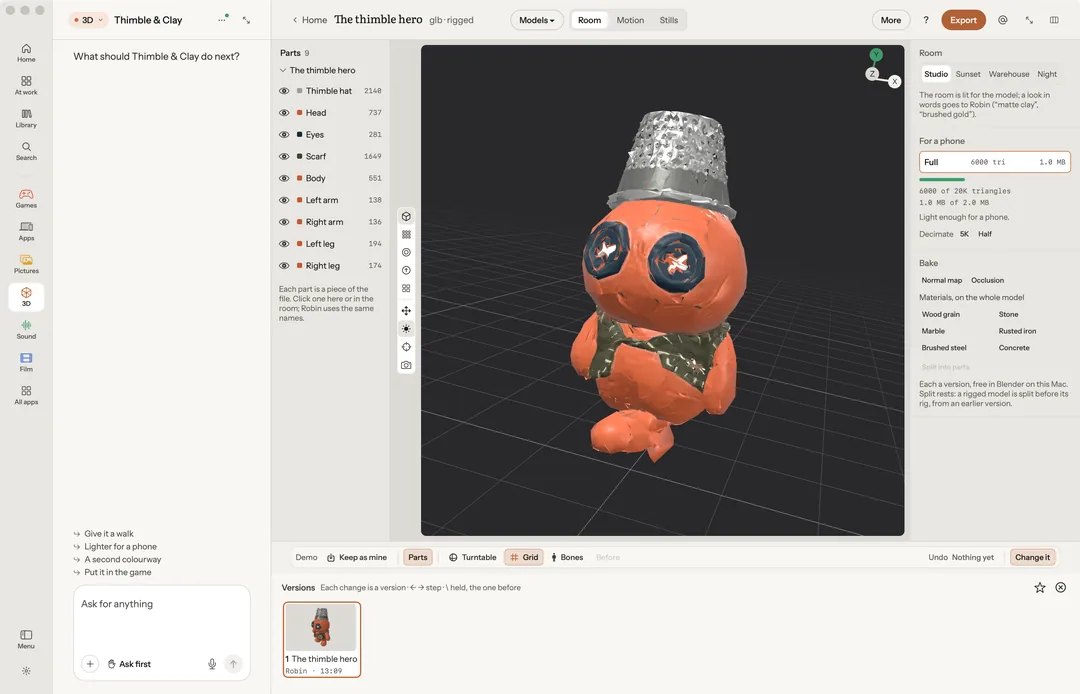
3D makes a model from a picture, rigs it, sets it moving and shows it in a lit room. Ask in the chat ("What are we modelling?"), or open a model you have.
Robin can do this too. From the chat, Robin opens the Generate panel, rigs a model, decimates or smooths it, bakes a map or a material, splits it into parts, plays its motions, changes a part's colour and finish, and exports it. A paid model, motion or split is priced first.
Make a model
The Generate panel takes a front picture, and if you have them, the back, left and right. Pick an engine, or Best for this, and a style. It is paid on your own key, and each engine shows its price before anything is sent.
Import opens a .glb or USD file for free. An .obj, .stl or .ply needs Blender on your Mac.
Look at it
The rail's views are Shaded, Wireframe, Matcap, Normals and UV checker. Turntable turns the model slowly on its own.
In More, under Look at it: the room's light, what to draw over the model (vertices, axes, bones), the room it is lit by (Studio, Sunset, Warehouse, Night), and Put the camera back where it started.
Change it
- Decimate cuts the model to 50K, 20K or 5K triangles, to half, a quarter or a count you set.
- Smooth smooths it in five passes and keeps its volume.
Both are free, and both need Blender 4.2 or later on your Mac. The Blender add-on ships inside Robin; the first time, macOS asks for Screen Recording permission.
Each part's material, colour and finish can be changed on your Mac for free.
Bake
Under Change it, Bake holds what a game engine or a viewer needs from a model, each a new version that Undo takes back:
- Normal map: the detail of the fuller version a decimate came from, baked onto the lighter one, so a 20K model reads like the 200K it came from.
- Occlusion: where light cannot reach (creases, under a hat, between fingers), baked into the model's own occlusion texture.
- Wood grain, Stone, Marble, Rusted iron, Brushed steel and Concrete: a material built in Blender and baked down to colour, roughness, metal and a normal map, on the part you picked or the whole model.
The bakes are free, in Blender on your Mac. A model with no UVs is unwrapped first. Without Blender, each press says Needs Blender and changes nothing.
Split into parts sends the model to your 3D service, which splits it into its pieces; each comes back as its own part, named from the top down and coloured from the model, as a new version. It is paid on your own fal key, about 45¢, its price said first, and it needs Blender too. A rigged model is split from an earlier version, before its rig.
Make it move
Motions… opens a shelf of 79 motions. Idle, walk, run, jump, attack, hit and death are free on your Mac: they play on a mannequin, and Blender carries them onto your model's skeleton. The rest are paid on your own key, priced first.
Make from it
Use this view hands the view to the chat: A picture from this view, A short film from this view, or Just the frame, in my message. A picture of this view, into the library saves it.
Export
Export to .glb, .obj, .stl or .ply for free, and to FBX for a game engine from the clip strip.
Keys
| Key | What it does |
|---|---|
| W E R | Move, turn, size (⇧-drag snaps) |
| 1–5 | The five views |
| F | Camera back |
| K | A snapshot into Stills |
| Space | Play or pause the motion |
| H / ⌥H | Hide the part / show all |
| / | Only this part |
| I | Change it |
| T | Three tries (with nothing picked, the turntable) |
| G B L | Grid, bones, the parts column |
| ⌘E | Export |
| ← → P X | Step through versions, keep, not this one |