
Your keys and what things cost
Robin runs on your own providers. Every make says its price first, shows where it is, is never sent twice, and says plainly when it fails.
Robin does not sell credits or add a margin. A lot of it runs on your Mac for free. When a job needs a model or a generator, it runs on your own account with a provider you chose, and you pay that provider what they charge.
Where answers come from
Settings › Providers ("Your own keys, kept in the Keychain") picks where the chat's answers come from:
- Your Claude: the Claude Code you installed, signed in with your own Claude plan or API key. Robin never sees your login.
- OpenRouter, behind your key.
- A model on this Mac, through Settings › Model: Ollama, LM Studio, llama.cpp, vLLM, or a server you run. It costs nothing.
- A key of your own with OpenAI, Anthropic or Gemini.
- Automatic picks among the ones you set up.
Press Test to check a key.
Pictures, video, sound and 3D
Paid generators are added under Settings › Connectors › Providers. Paste a key and press Save. Nothing is made with a provider until its key is saved. Keys are kept in the Keychain, never in a preferences file.
| Provider | What it makes |
|---|---|
| fal | Pictures and their redraws (a new angle, relight, fill, Make it bigger), clips, 3D models and rigs, a 3D place, sound effects, music, full songs, speech, and stems |
| ElevenLabs | Voices, a dub, changing a voice, cleaning a recording, reading words back, sound effects, full songs |
| Runway, Luma | Clips and pictures, as a choice |
A full song comes from ElevenLabs Music, or from MiniMax Music or ACE-Step on fal. Suno has no official public API, so Robin does not offer it.
Without a key, a press that needs one says Needs your own key, and pressing it says which key to add and where. Nothing is sent or charged. Everything that runs on your Mac still works. Some presses run on your Mac first and offer a key only when the Mac cannot: erasing, and cutting out a subject. Others have no route on the Mac at all: the redraws, Make it bigger, splitting into stems and cleaning a recording each need a key.
Which model makes it
Settings › Media models has a row for each kind of make, from a new picture or a clip to a voice, a full song, a set’s tracks, a 3D model or a 3D place. Each row shows its model, what that model can do (its lengths, shapes and sizes, what it takes and what it gives) and its price.
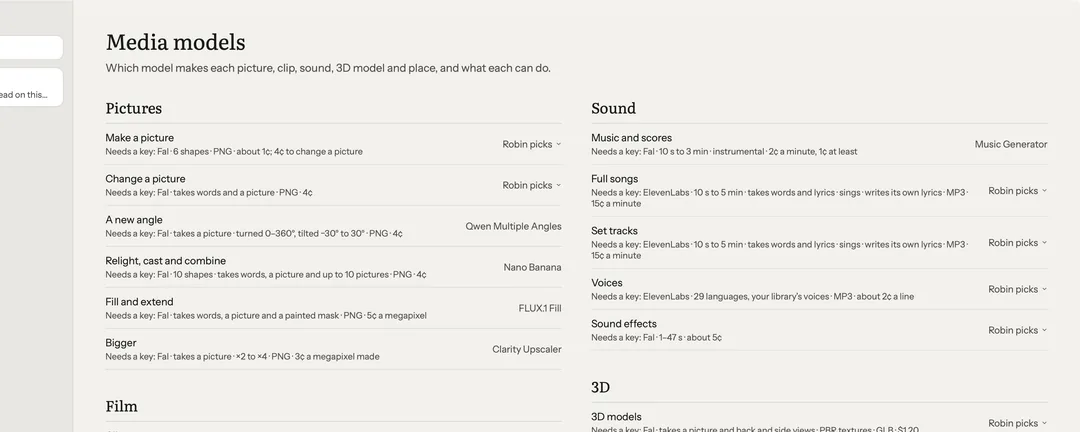
Robin picks to start: the usual model when it can do the ask, else the cheapest that can. Choose your own there, or on the model chip beside a make. When an ask needs more than the chosen model makes, Robin says so in a line and picks one that can. Robin never asks a model for more than it makes: a set track longer than the model allows is made as the longest piece it can, and your Mac builds the rest.
The price before it runs
Every make says up front what it costs, about how long it takes, and whose it is. You see it on the press, in the chat box and on a helper's card:
- Free, on this Mac
- Your Claude plan
- About 40¢ · ~2 min · your own key
Nothing is spent until you press. The prices are the providers' own, checked against their published prices. Where a provider publishes none, the press shows Robin's estimate. Reading words back with ElevenLabs is priced by its length, about 1¢ a minute, and waits at your limit like any make.
Ask me first
Settings › General › Ask me first above sets the limit. A make that costs more waits in its chat for your yes before anything is spent:
- Never ask
- Anything that costs
- 50¢ or 50 credits
- $1 or 100 credits (the default)
- $5 or 500 credits
A make that waits shows From Robin, before it starts, with the ask read back as it will be sent: A wide picture (16:9) of “a lighthouse at dusk”, on your own key. Then Make it (as read back, at this price, this once) or Not now (nothing is spent). The limit holds in every mode under the chat box, Approve for me too: what Robin may do without asking never includes spending above it.
To see every paid ask before it goes, whatever it costs, turn on Settings › Spending › Read each paid ask back first. Each one then waits in its chat for Make it, so a wrong length, shape or picture is caught before anything is spent.
While it makes
Every paid make shows where it is, on the bench, in the chat and on the window's bar. It is being sent, waiting in the provider's queue (with how many are ahead, when the provider says), being made, then brought to your Mac. Its price shows as pending until it lands, and a note says when it is slower than usual.
Work of many parts, such as a set, is one card in the chat: each part made, being made, failed or still to come, how far it has got and about how long is left. Make the rest carries on, and a failed part has Retry this one.
Stop, on the card or the bar, or ⌘., stops it and keeps what is made. On a paid make, Cancel says first whether the provider will still bill it: one still waiting in the queue is taken back unbilled where the provider allows it; one already being made is still billed.
Checked when it lands
Settings › Spending › Check each take against the ask looks at each new picture before it is shown:
- On this Mac (to start): its shape, any words you asked to be written in it, and a clear ground when you asked for one. Free.
- On this Mac, then your Claude plan: the same, then your own Claude looks at the picture beside its ask.
- Don't check.
A check never throws a take away. What does not match is said beside it, so you can make it again. A picture that comes back blank, or a sound that comes back silent, is a miss: it is never booked.
When a make goes wrong
A paid make is your own money, so Robin is careful with it.
- Never sent twice. Robin sends a make again only when the provider surely never took it. If it may have reached the provider, Robin does not send it again: it says so, and what to check.
- It survives quitting. A make still on its way when Robin closes is picked up at the next launch and lands where it was going. Nothing is sent or charged again.
- Billed or not. A make that fails, comes back blank or is refused is never booked in Spending, and it says whether its provider billed it: "did not bill it", "billed it" or "may have billed it".
- Retry looks at the same job again, free, while the provider still has it. It sends the make again, at its price, only when the provider never took the first.
- Report this problem opens a new GitHub issue with the details filled in, for you to read and change before you submit it there. No key, email or home folder is in it. Copy details puts the same text on the clipboard.
These presses sit on the failed make's card, and in Settings › Spending › Problems.
How much Robin may do
Under the chat box, each chat picks one of three:
- Look only: Robin reads and looks, and changes nothing.
- Ask first: Robin writes in your folders; a command, or a coding agent on a folder, is asked once each, with "don't ask again". A new chat starts here.
- Approve for me: Robin writes and runs commands in your folders without stopping. It can be given for an hour or a day, then the chat goes back to Ask first on its own (see Two hands).
In all three, publishing, shipping and anything that leaves your Mac always ask. A paid render or a 3D place is offered with its price, never started on its own.
Settings › Spending
Spending lists each paid job: when, what, on which key, its price and what was charged. It totals them By month and By day. Keys lists each key by its provider and whether it worked last; a key's value is never shown.
At the top, Before and after a make holds Read each paid ask back first and Check each take against the ask. Problems lists every paid make that failed, got stuck, or was made but could not be placed: what happened, whether it was billed and what to do, with Retry, Show the file, Copy details and Report this problem.
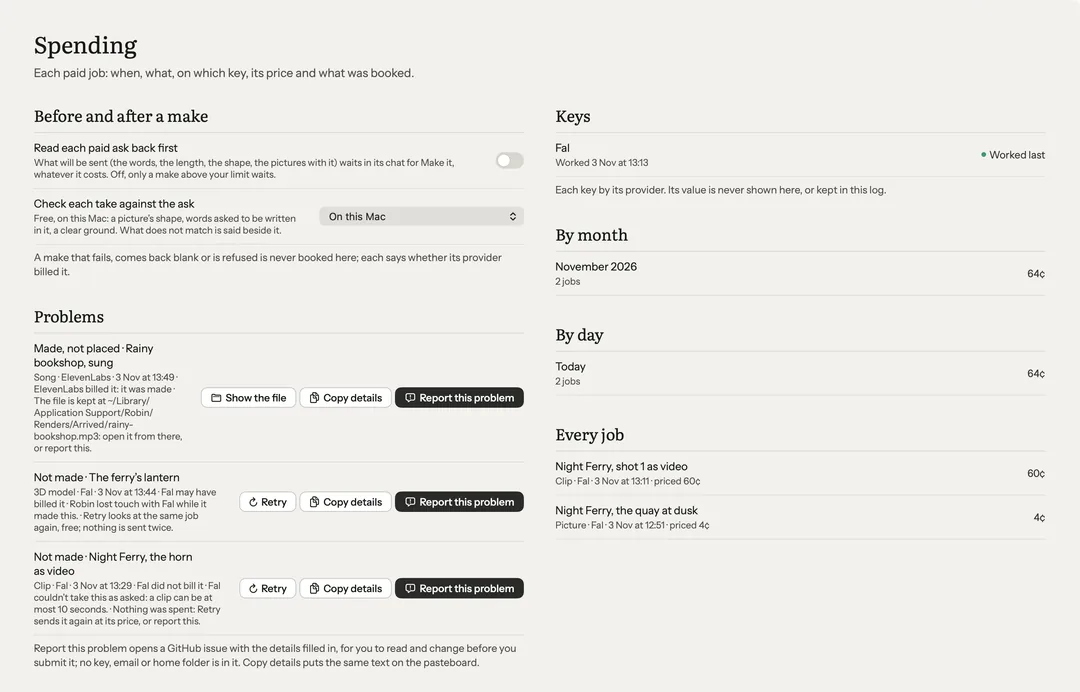
Settings › Activity lists every run and what it cost.