
Apps
Web, iPhone and Android apps, run on your Mac beside the chat and checked.
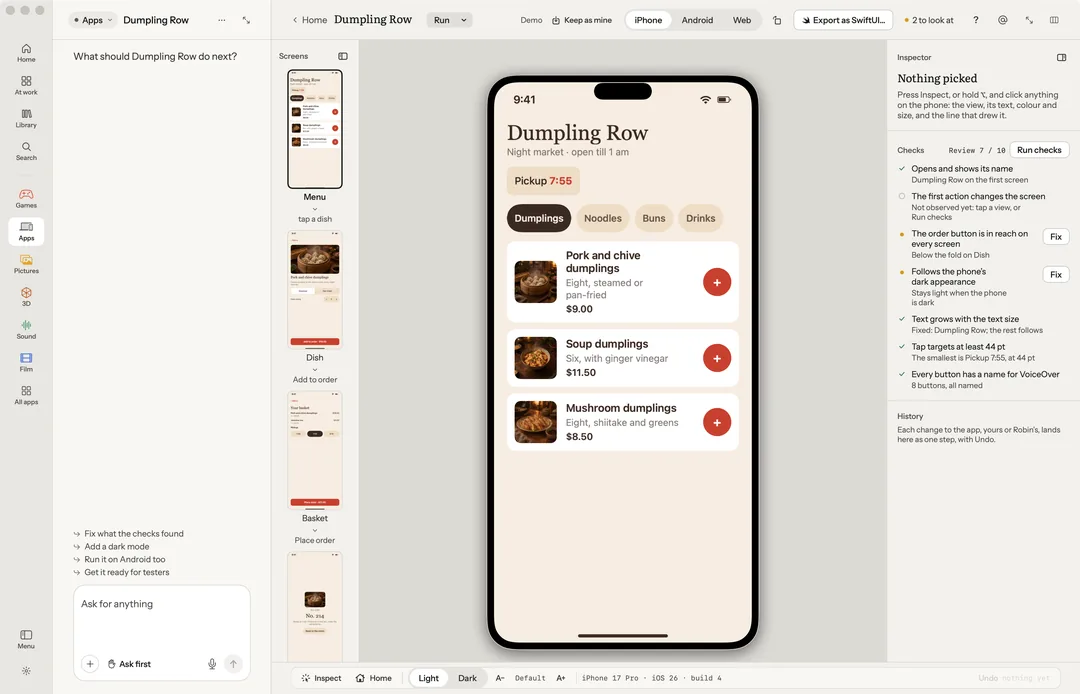
Apps makes web, iPhone and Android apps, runs them beside the chat and checks them. Say what you want ("What are we building?"), or start from a starter: Habit tracker, Notes, Landing page, Focus timer, Budget, Recipe box or Dashboard.
Robin can do this too. From the chat, Robin inspects a view and changes its text, colour, size, corners and padding, turns the phone, switches light and dark, runs the checks, runs the app on the iPhone or Android, opens its Source, and exports the design as SwiftUI. Sending a build out asks you first.
Kinds
- Web: runs in the browser beside the chat, and can go online.
- iPhone: SwiftUI, on the Simulator.
- Android: Kotlin and Compose, built with Gradle, on the emulator.
The bench
The app runs on a phone. Its Screens run down the left; the Inspector and Checks sit on the right; History lists each change.
- Inspect a view, then Change it: text, colour, size, corners and padding, tried live. Keep or Put back, and Before to compare.
- Takes and Fix.
- Home, Rotate, Light or Dark, and text size.
- Web shows the phone and the browser side by side.
- Run it on the iPhone or Run it on Android.
- Export as SwiftUI… writes the design on the bench out for Xcode: a View per component and screen, each with its preview, and a Theme of its colours and spacing. Copy as SwiftUI in the inspector puts the one part on the clipboard. Both free, on your Mac.
Source
Source shows the app's code in the editor the Code app uses: its files as a folder tree or grouped, the outline, what Robin wrote and the problems, with go to definition (⌘-click), hover and errors wherever a language server is on your Mac. Robin writes it; point at a file and ask. See Code.
Checks
Run checks boots the app, taps through it and checks it, on your Mac, for free. The review, scored out of ten, needs a model, so it costs what your model costs.
Ship
Prepare the build, Send to TestFlight… or Send to internal testing…, and Screens for the store. A web app publishes to Cloudflare Pages (your own sign-in) or a folder, and always asks first.
What you need
- Web: Node.js.
- iPhone: Xcode with a Simulator runtime, and idb.
- Android: Android Studio (the SDK, the emulator and adb) and Java 17 or later.
Keys
| Key | What it does |
|---|---|
| I | Inspect |
| ↑ / ↓ | The view it sits in / the first view inside it |
| ← → | The views beside it |
| Delete | Remove the view |
| ⌘← ⌘→ | Turn the phone |
| P X \ | Keep, not this one, the one before |
| ⌘L | Ask |
| Esc | Let go (on Android, Back) |
⌥-click picks a view without Inspect.