
Stage
Block a shot by hand, with a place, a cast, props and a camera, then sketch it free and render that frame.
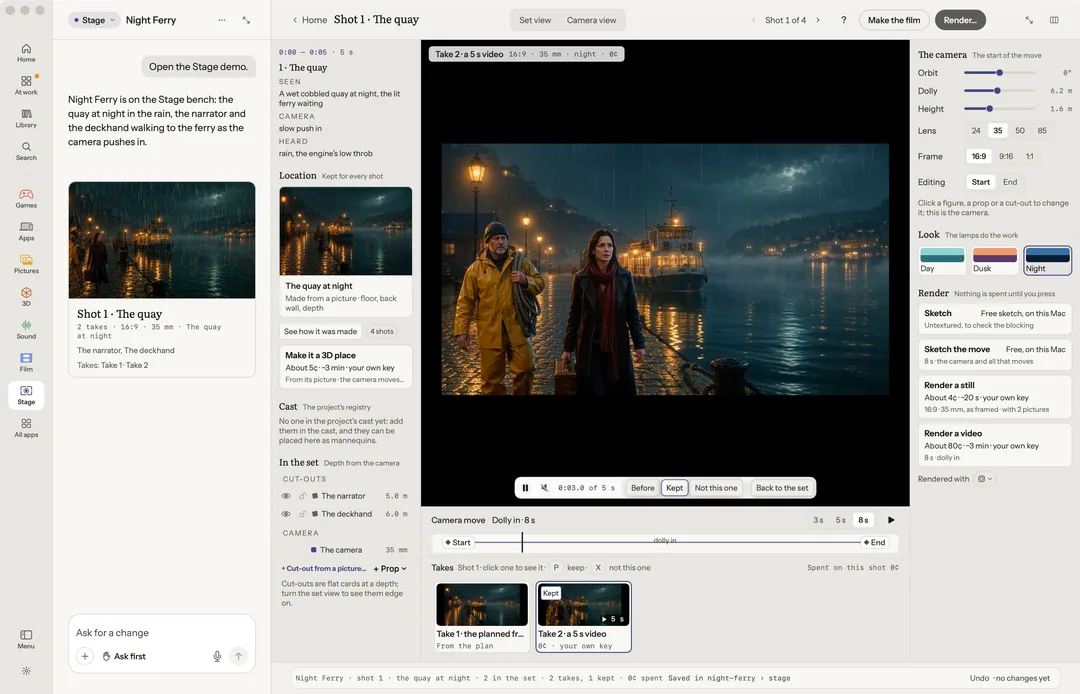
Stage is for blocking a shot by hand before anything is rendered. You build a set, stand the cast in it, move the camera, and only then make the frame.
On an empty bench: Block a shot, Start from a picture… or Open the sample. Or ask in the chat ("What is the shot?").
Robin can do this too. From the chat, Robin sets a room or outdoors and the weather, adds a cut-out or a prop, places and poses the cast, picks the lens and the frame, sets where something ends, and sketches the move. A render or a 3D place is put to you with its price first.
The place
Make a place from one picture with Start from a picture…, free on your Mac. Place sets it as a Room or Outdoors. The picture is laid back on the ground and the far scene, so the camera can travel through it. Weather adds Rain or Snow. Pick day, dusk or night. In Night Ferry's demo, the quay's own lamps light whoever stands in it.
Make it a 3D place turns the place into a 3D place from the one picture, on your own key, priced first.
The cast and props
The project's cast stand in the set as figures you can pose. Real people can stand in it as cut-outs: + Cut-out from a picture… under In the set. Press + Place in the set to add someone, or + Prop for a thing, then set Facing, Size and Depth.
Drag a dot on a hand, a foot or the head to pose a figure by hand, or press 1–5 to stand, sit, wave, point or walk.
Set where it ends gives a figure or a prop the place it moves to while the camera moves. Stand still takes that back.
The camera
Orbit, dolly and height, a 24, 35, 50 or 85 mm lens, and a 16:9, 9:16 or 1:1 frame. A move runs 3, 5 or 8 seconds from a start to an end keyframe. Set view and Camera view switch between looking at the set and through the camera. New shot starts another; the bar steps through them.
Sketch, then render
Nothing is spent until you press.
- Sketch and Sketch the move make a still or a short video of the shot, free on your Mac, before anything is rendered.
- Render a still draws the frame from the cast's own pictures.
- Render a video follows the sketch of the move, so people go where you set them, beside the camera's own path.
Make the film puts every shot onto a Film timeline at its time, as its kept take: free, on your Mac. Render every shot as video renders the rest together, priced first. See Film.
Renders are paid on your own key and show their price first. With no key, a render says Needs your own key, and pressing it says to add one in Settings › Connectors. Robin offers a render; it never starts one on its own. Above the limit you set in Settings, a render waits for your yes.
While a render is made, its card says where it is (sent, waiting in the provider's queue, being made, brought back) and its price, pending until it lands; Cancel says first whether it will still be billed. A render that fails says whether it was billed, with Redo and Report this problem. See Your keys and what things cost.
Every render is a take: Keep, Not this one, or Before to compare, then Back to the set.
Keys
| Key | What it does |
|---|---|
| V | Set view or camera view |
| G | Thirds guide |
| Tab | The next thing in the set |
| 1–5 | Stand, sit, wave, point, walk |
| Arrows | Nudge (with ⇧, farther) |
| [ ] | Turn |
| L A | Lens, frame |
| Home End | Start and end keyframe |
| Space | Play the move |
| S | Free sketch |
| R | Render… |
| C M T | Change it, Move…, takes |
| P X B | Keep, not this one, before |
| H Esc | Hide, let go |
| ⌘L | Ask |
| ? | Help |