
Games
A line to a game you can play, publish and share, made for the web, a phone or a game engine.
Games turns a line into a game you can play, publish and share. Say what you want ("What game are we making?"), or start from a starter: Catch, Platformer, Tower defence, Racing, Puzzle, Quiz or Arcade.
Robin can do this too. From the chat, Robin chooses where a game plays, opens each view and step, plays the sprites and the captures, records a clip, plays the game full screen, turns the phone, inspects a web game, runs the checks and makes takes. Publishing asks you every time.
Where it plays
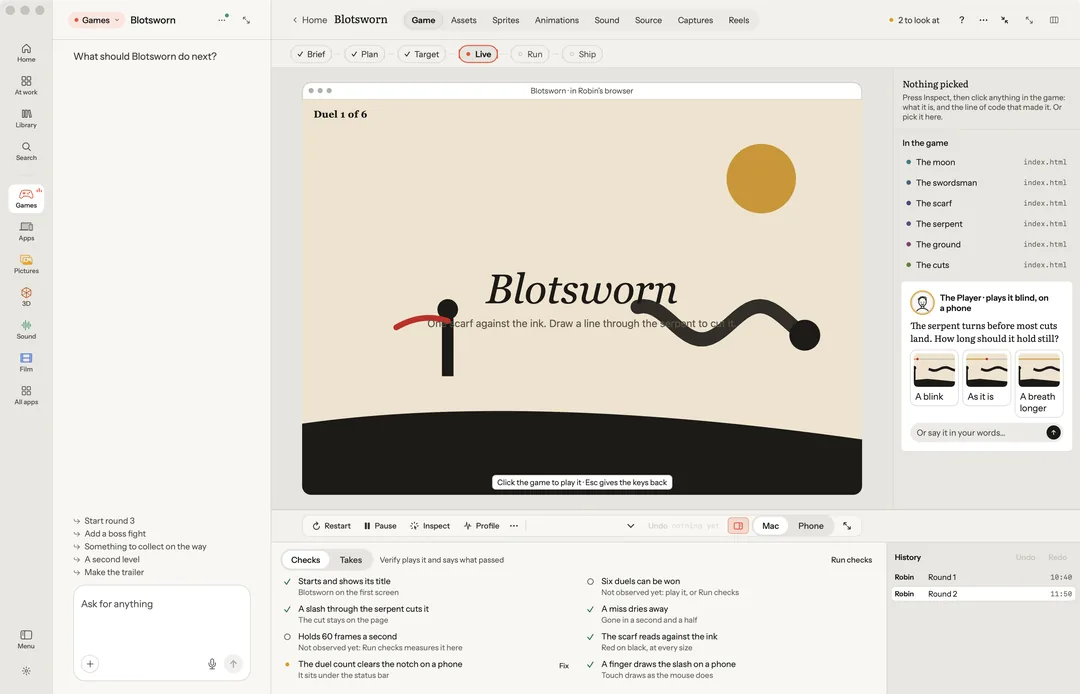
Choose 2D or 3D, then where it plays: Web, iPhone, Unity, Godot or Defold. A web game runs in Robin's own browser beside the chat. Play it full screen, turn the phone it plays on, and inspect a web game to point at what is in it and ask.
The steps
Inside the game, the work is one line of steps, each marked done, now or next.
- Brief: the brief as a card. Change it, or Yes, start the work.
- Plan: the plan as a sheet, with your notes in the margin. Apply or Revise.
- Target: the frame the game is aiming for, beside its newest frame. Mark up what is off.
- Live: the game running, sized to the room the window gives it. Restart, Pause, Inspect, Profile, Picture, the frame rate, and Mac or Phone. Pick something in the game to Ask about it, Change it, see its Takes or Remove it. Try its values live, then Keep or Put back.
- Run: how the game was made, as the team's graph and a numbered story.
- Ship: the launch page: title, line, keywords, Press kit, Screening (the critic panel), Dry run and Publish. Publishing always asks you first.
The views
Every part of a game is a view away, each read from the game's own folder:
- Game: the game itself, with its steps.
- Assets: everything it is made of, at a glance.
- Sprites: every picture it draws. Each sheet and run of frames plays in order at the speed you set (12 frames a second to start), looped or back and forth, a frame at a time when you want.
- Animations: what moves, each model in its clips.
- Sound: its music and every effect, to hear and change, by their real names. Only what the game plays is here; a set made in Sound for the same project is one line at the foot, to open in Sound.
- Source: the game's code, in the editor the Code app uses: the files as a folder tree, the outline, what Robin wrote and its problems, with go to definition (⌘-click), hover and errors from a language server. Robin writes it; point at a file and ask. See Code.
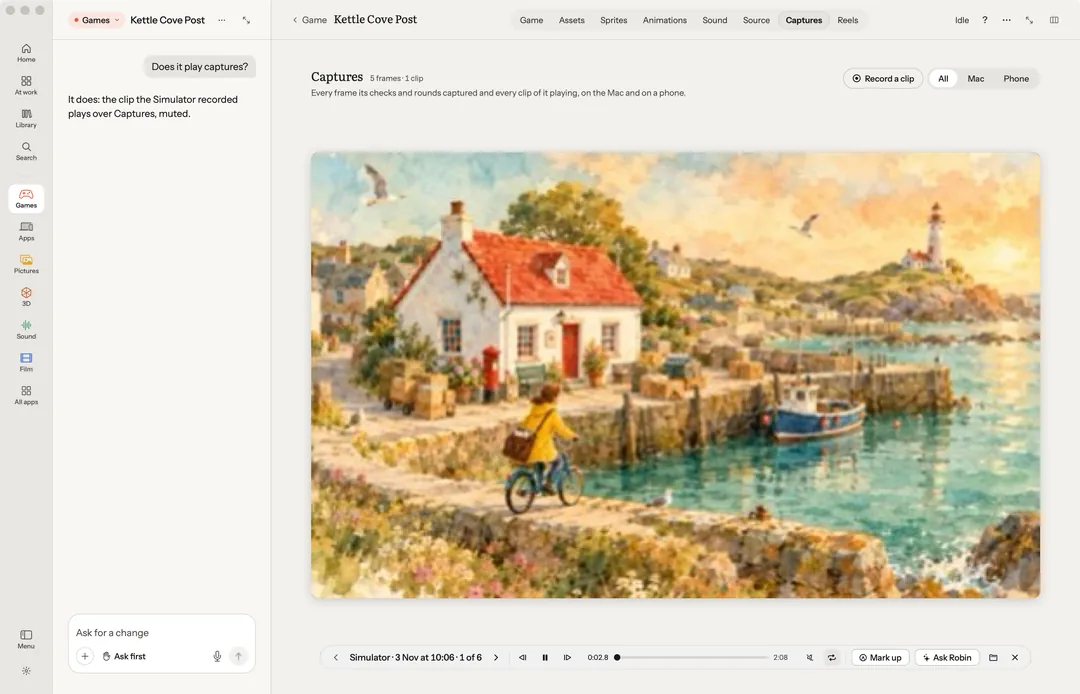
- Captures: every frame and clip its checks, rounds and recordings caught, on the Mac and on a phone. Open one and it plays under the header: a clip looped, with a scrubber, its time and its sound; a round’s stills as a flipbook, Fast, Normal speed or Slow. Step a frame at a time, mark it up or ask about it. Record a clip films the game as it plays, on the Simulator or in the preview, and the clip lands here.
- Reels: trailers and share videos cut from its real play.
- Levels, once the game has levels: laid out by hand or by Robin, and played from there. Paint, erase, fill, draw a rectangle, place a start, an enemy, a pickup or a goal, then Play this level.
Checks
Run checks plays the game again and checks everything, on your Mac, for free. Checking a web game needs Node.js on your Mac.
Publish
Publish to itch.io, Cloudflare Pages, or a folder (the dry run). It always asks first. A game's Trailer and Ad are in the More of its Live strip; Make this into… turns it into a trailer, an ad, a store page or a post.
What you need
- A web game: Node.js.
- Publishing: the game kit's command line.
- Unity: Unity Hub with an editor.
- iPhone or Android: see Apps.
Keys on Live
| Key | What it does |
|---|---|
| R | Restart the game |
| Space | Pause, and play on |
| ⌃⌘F | Play full screen (Esc comes back) |
| I | Inspect |
| Delete | Remove what is picked |
| P X \ | Keep the take, not this one, the one before |
| ⌘Z ⇧⌘Z | Undo and redo on the game's files |
| ⌘L | Ask |
Click the game to give it the keys (arrows, WASD and the rest); Esc gives them back.
Keys in Captures
| Key | What it does |
|---|---|
| ← → | The capture before, the next |
| Space | Play a clip, or a round’s frames in turn; again, pause |
| , . | A frame back, a frame on |
| M L | A clip’s sound, its loop |
| Esc | Close the capture |