
Film
Explainers, trailers and a cut, from brief to publish; cut by the words, cut into shorts and delivered for every platform.
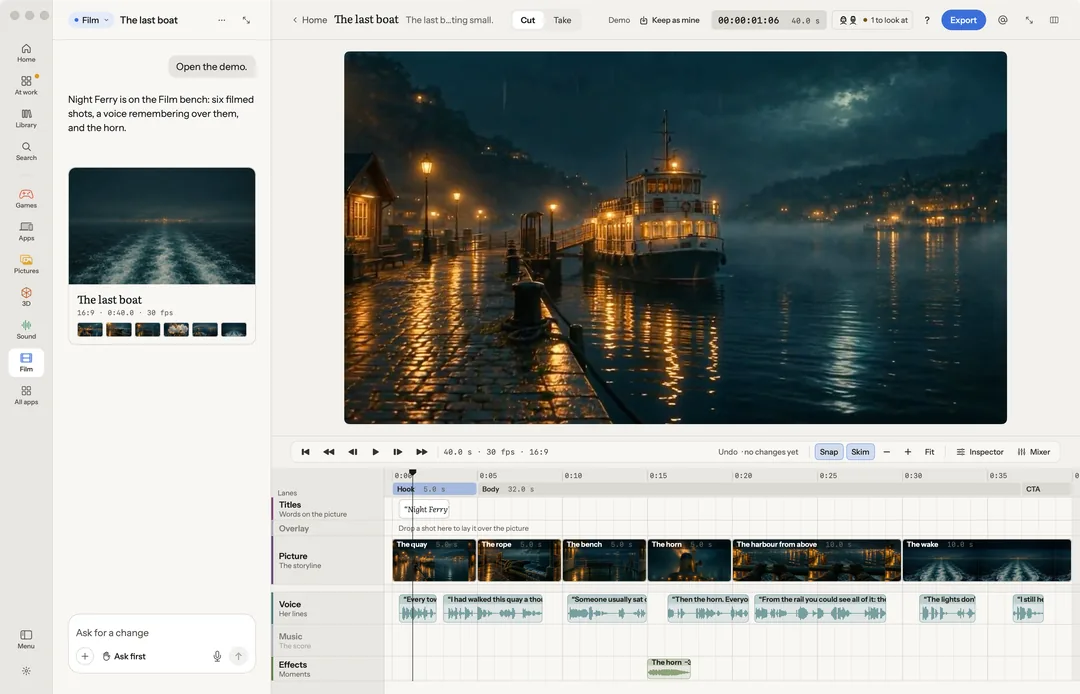
Film is for a cut: an explainer, a trailer, a short. You cut by the words, cut the best stretches into shorts, and deliver a file for every place you post. The cut, the mix and the export run on your Mac, with nothing to install.
Robin can do this too. From the chat, Robin cuts and trims, matches the loudness, opens the scopes, eases or holds a keyframe, adds a mask and makes it follow a thing, lays a multicam and cuts its angles, makes titles, exports an edit list, and changes, restyles or extends a shot. Each paid step is priced first.
On the rail
- Add to cut: puts this take, or the stretch you marked, at the end of the cut.
- Cut by the words: Take out the ums and ahs, Tighten the long pauses, or Cut words… from the transcript.
- Make ranked shorts: the take's best stretches, 15 to 60 seconds each, framed and captioned, best first. Five shorts, 9:16, Five square shorts, or Three of a minute each.
- Deliver for every platform: a file for each shape, mastered to loudness. Every platform, or one place at a time.
All four are free. The speech is heard on your Mac when macOS's speech model is allowed for Robin; otherwise it is read back with your voice key, priced by its length (about 1¢ a minute) and asked first above your limit.
In More
Make a film: Montage to a song cuts your clips to a song's beat, a take in every shape. Series… makes a run of shorts that keep one look.
Edit the cut:
- Cut on the beat ends every shot on the music's nearest beat, as a new take.
- Titles: a name and role, a chapter, a quote or credits, animated on the cut.
- Match the shots matches each shot's colour to the first on export.
- Narrate: write a narration and hear it on the speech lane. Free with the Mac's own voices; a studio voice needs your voice key.
- Effect: a sound effect at the playhead. Paid.
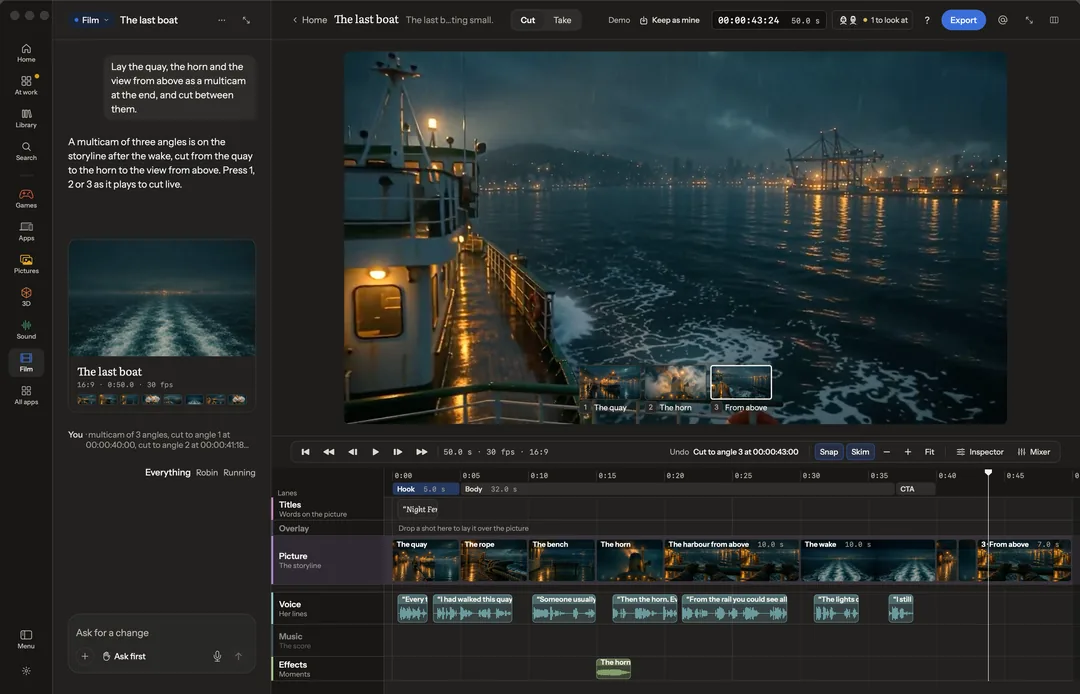
- Multicam: the clips of one moment from several cameras, put in step by their sound and laid on the cut. Cut between the angles under the picture, or with 1 to 9 as it plays. Free, on your Mac.
Sound for the cut (each priced first):
- Sound it: sounds made to match the picture, on the Effects lane. What the picture shows, or Say what it sounds like…
- Music to the cut: music the length of the cut, its beats landing on the edits and ducked under the voice. Played on your Mac first.
- Re-voice the line…: the chosen line said again in a cast voice, keeping its timing.
Find and mask (free):
- Search footage… finds a moment across a folder of clips by what is said or seen in it.
- Mask the subject keeps the subject and removes, blurs or replaces the background, or makes a green screen.
Make a new take (each opens a priced panel):
- Change the shot… changes a marked stretch of 2 to 10 seconds by words, or by words and a picture.
- Restyle the shot… gives the take another look, every movement kept.
- Extend the clip… carries the take on from its last frame.
- Make a clip between these… moves from one still to another.
Comment, dub and meme: Comment on this moment…, Dub… (the take in another language, captioned) and Make a meme of this frame…. Each leaves an ask in the chat box for you to send.
Export and share: Post… checks the cut for TikTok, Reels and Shorts, saves a file for each and hands it to each app; you press post yourself. The shape it exports in (9:16, 1:1, 16:9 or 4:5), Save this frame, Share the clip, and Edit list for another editor: a CMX 3600 EDL, Final Cut Pro XML or OpenTimelineIO, against the same source files. If Final Cut Pro is on your Mac, Open in Final Cut Pro is there too.
From the Stage
On the Stage, Make the film lays every shot onto a Film timeline at its time, as its kept take: its video, else its still with a camera move, else the sketch of its move, with a title card: the film’s name over the place. It is free, on your Mac, and the cut opens here to trim and mix like any other. Made again, only a shot whose take changed is swapped; your trims, titles and sound stay. Render every shot as video renders the shots that have no video yet, priced together first, on your own key. See Stage.
A clip over 90 MB goes up to fal in parts, so a long take can still be changed or restyled on your key.
Measure it
A loudness meter sits beside the mix and matches it to −14 for social or −23 for broadcast in one press. Scopes over the picture show the waveform, the parade and the vectorscope. Keyframes can hold as well as ease.
Masks on a clip
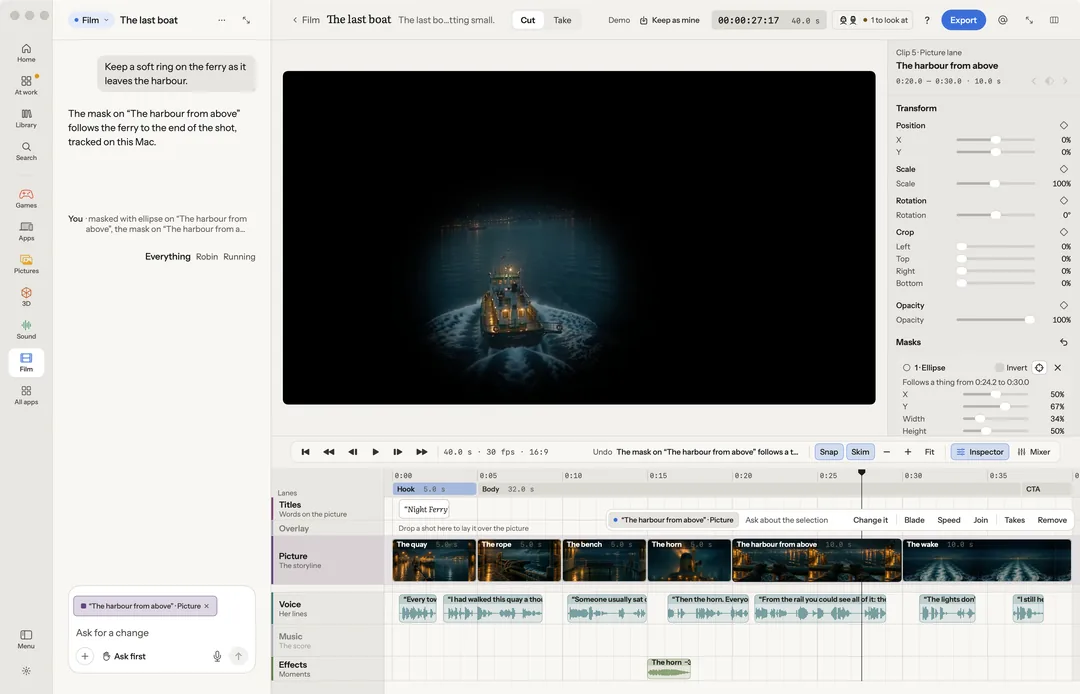
A rectangle, an ellipse, bars, a split or a star on any clip: placed, sized, turned, feathered or inverted, by hand or by asking.
Follow a thing keeps a mask on what it covers as it moves through the shot, from the playhead on. The same press beside an overlay moves it with the thing that stands out most in the shot under it (as position keyframes you can change after), and beside a title picked on the Titles lane carries the title with it. Free, on your Mac.
Keys
| Key | What it does |
|---|---|
| Space / ⇧Space | Play or pause / play the selection |
| J K L | Shuttle |
| ← → | A frame (with ⇧, ten) |
| Home | Go to the start |
| I O | Mark the start, the end |
| ⌘B | Blade |
| Delete / ⇧Delete | Remove (the gap closes) / lift (a gap is left) |
| , . | Nudge a frame (with ⇧, ten) |
| ⌥[ ⌥] | Trim to the playhead |
| ⌥K | Keyframe |
| 1–9 | Cut to that angle of the multicam; as it plays, live |
| N | Snap |
| ⌘E | Export the cut as one film |
| ⌘= ⌘− Z ⇧Z | Zoom in, out, to the selection, fit |
| ⇧M M S | Mixer, mute, solo |
| ⌥1 ⌥2 ⌥I | The cut, the takes, the inspector |
| P X Return | Keep, not this take, use it in the cut |
| ⌘L | Ask about the selection |
| ? | Help |