
Robin 1.0
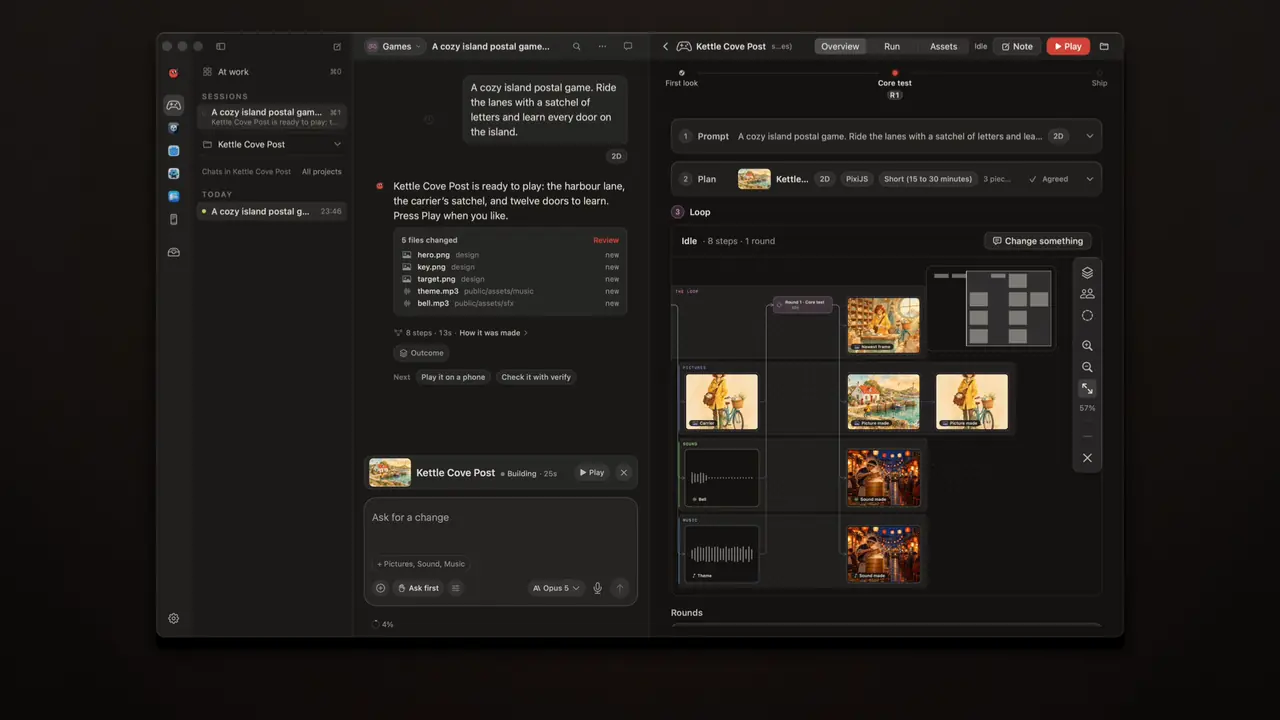
Robin is a creative studio for the Mac. You make games, apps, pictures, films, music, 3D, pages, ads and posts in it, and Robin works beside you the whole time.
Today it reaches 1.0.
Two hands
Every app in Robin has a bench: the picture, the cut, the song, the shot. You can do everything on it by hand. You can also say what you want in the chat, and Robin does it on the same bench, with the same presses you would use.
That is the idea all the way down. A press you make and a press Robin makes run the same code. While Robin works you see it on the bench, its pointer resting where it last pressed and a chip saying what it is doing, and the chat keeps the log of both hands. When Robin changes something, you see where, you can undo it, and you can compare it with the version before. Under the chat box you choose how far it goes: Look only, Ask first, or Approve for me, even just for an hour or a day.
What is in it
- Pictures. Click a subject to pick it, and erase it free on your Mac. Fill, relight, extend to a new shape, or see the scene from a new angle, on your own key.
- Film. Edit by the words. Scopes, loudness matched to −14 in one press, masks, keyframes. Extend a clip, restyle a shot, or make sound to match the picture.
- Sound. Songs, voices, pads, sets and a radio. Hum a tune and it becomes notes. Record over a lane and every take is kept. Make a full song, sung, on your own key.
- Stage. Make a place from one picture, stand people in it, move the camera, sketch the move free, and render the shot as a still or a video on your own key.
- Code. The editor speaks to a language server: hover, completion, references, rename across files, quick fixes, for Swift, TypeScript, Python, Rust, Go, C, Kotlin and more.
- 3D, Vector, Games, Apps, Pages, Ads and Posts, each with its own bench and keys. Apps exports SwiftUI; Pages reads and writes IDML and presents slides with Magic Move.
Every app but Code has a demo. Open one and press through before you make your own.
What it costs
Robin runs on the Mac first. Picking a subject, erasing, tracing a picture, humming a tune, mixing a set: free, on your Mac.
When a job needs a model, you bring your own: your Claude plan, or your own keys with the providers you choose. Every make says its price before anything is sent, and above the limit you set it waits for your yes. Settings › Media models says which model makes each thing, what it can do and what it costs. Settings › Spending lists every paid job by day and month. A paid make is never sent twice, carries on after you quit, and if it fails it says whether it was billed, with Report this problem one press away. Robin never sells credits.
What it will not do
It will not hold your work hostage. Everything you make is a file in your own folder, saved as you go, exported without a watermark. Robin never trains on what you make.
What is next
A cast that looks the same in every app.
Robin 1.0 is ready to download at getrobin.app. Requires macOS 15 or later. The docs say how each app works.
Everything new in 1.0
Robin
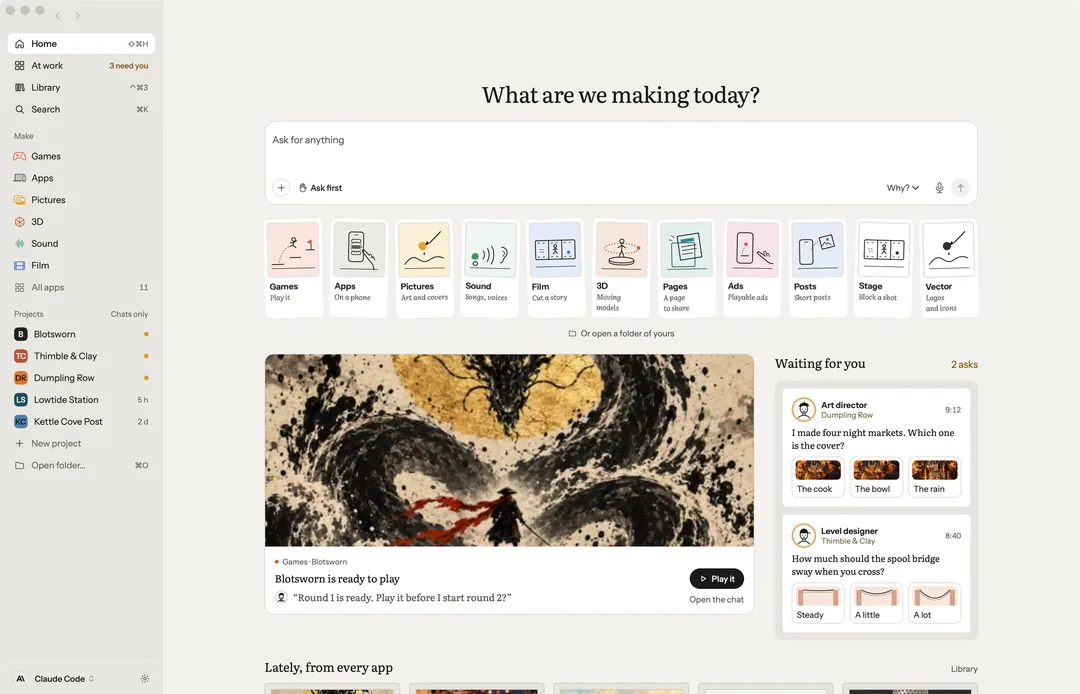
- A creative studio for your Mac. Games, Apps, Pictures, Vector, Sound, Film, Stage, 3D, Pages, Ads and Posts, and Code with Settings › Developer tools on, each an app of its own with only the tools its craft needs, beside the chat; Sound holds music, voices, the pads, sets and the radio as five tabs. Home shows what needs you today and what every app made lately; your projects are in the sidebar.
- Three ways to let Robin work. Look only, Ask first, or Approve for me, picked under the chat box. Approve for me writes and runs commands without stopping; publishing, shipping and anything that leaves your Mac still ask, and a paid call still waits for your yes above the price you set in Settings › General › Ask me first above.
- Consent that runs out. Approve for me, or don’t ask again, for an hour or a day, with the time left on the chip. A quit ends it.
- Each chat has its helpers. A director leads the work; an art director, an audio director, a level designer, a player and a critic do their parts, and you can watch the team at work. When it is your call, they ask.
- Robin on the bench. While Robin works, its pointer rests on the last control it pressed and a chip says what it is doing now. One press hides it.
- The chat is the log. Your presses and Robin’s actions in one stream under the messages, each with Undo and Show me; Everything, Robin or Running chooses what shows.
- Point at it and say, or just change it. Drag a box over part of a picture, click a block of a page, or mark a stretch of a clip or a sound, and ask about just that part. Change it makes a plain change at once, free, one Undo away; on a picture, as a new version.
- Takes everywhere. Make 3 takes is a choice on every make, and the ones not chosen stay as versions. Step through them, Vary or Remix only the part you pointed at, and compare two pictures side by side or a song’s takes A/B.
- Next steps beside the work. Under the selected work, the two or three likeliest next steps: Vary, Cut out and Bigger for a picture; Loop, Cover and Video for a song. A game’s Trailer and Ad are in the More of its Live strip.
- Make this into… Turn a game into a trailer, an ad, a store page or a post; a song into a cover or a video; a page into a post or a deck. Or translate it, captions too. Nothing is spent until you press Send.
- Name who is in it. Type @ in the chat and pick someone from the project’s cast: their picture goes with what you ask, so they look like themselves. A picture, clip, sound, song or model made from an ask can be made again, priced first, and Settings › Spending lists every paid job by day and month.
- The price before it runs. Every make says up front what it costs, about how long it takes and whose it is: free on this Mac, your Claude plan, your own key, or credits on a connected account. Above the limit you set, a make waits for your yes.
- The ask read back, the take checked. Each paid ask can be read back before it goes, and each new picture is checked against its ask, free on this Mac or with your Claude plan.
- Paid makes you can trust. Never sent twice, picked up again after a quit, and a failure says whether it was billed. Report this problem and Copy details are one press, and Settings › Spending › Problems lists them all.
- Choose the model for each thing. Settings › Media models has a row for each kind of make, from a picture to a set’s tracks, with its model, that model’s limits and its price. Robin picks unless you choose, there or on the chip beside a make, and never asks a model for more than it makes.
- One card while it makes. A set being made shows in the chat as one card: each track made, being made or still to come, how long is left, a note when a step is slow, and Stop, or ⌘., keeping what is made. A paid make shows where it is too, sent, queued, being made or brought back, its price pending until it lands.
- Read back, priced. Reading words back on your ElevenLabs key says its price by length, about 1¢ a minute, and waits at your limit like any make.
- Arrange the window. Give any pane the whole window (⌃⌘↩, or double-click its head), Focus (⌃⌘.) to keep only the work in view, or pick which panes show and a layout from View › Layout.
- A Live window for your stream. View › Live window shows a set, the radio, the pads, a Stage shot or the film, borderless at 1920×1080 or 1080×1920, for OBS to capture. Or stream it straight out through ffmpeg on your Mac, to your own stream address; it asks every time.
- An AI channel. The Live window plays clips of your words, each made from the last one’s final frame, on your fal key: asked first with its price an hour, and stopped at the cap you set.
- Your own plan. Choose Claude Code and the conversation runs in the Claude Code you installed, signed in with your own Claude plan or API key. Robin never sees your login.
- Rewind, and keep or undo each change. Take a chat back to any message you sent, with the project’s files as they were. Every file an answer changed is listed under it, to keep or take back one by one.
- Several chats at once. Up to three chats side by side, a project’s chats as tabs, and Overview (⇧⌘\) to see them all. One amber count lists every chat that is waiting on you.
- A demo in every app. Every app but Code has a demo to press through before you make your own, from Night Ferry’s film, shots and voices to a game of every kind.
- Try it on Kettle Cove Post. A showcase project, ready on Welcome and in Help, to try a change, compare the takes and undo, with nothing to set up and no credits spent.
- Now playing, wherever you are. What is playing floats in a small card that plays the clip itself, says what it is in words, and takes you back to where it came from.
- For everyone. VoiceOver all the way through, voice control you can always end, and a check before a page, a picture, an end card or a cut goes out, for contrast, alt text, text size and captions, with Fix for me to mend what it can.
- Requires macOS 15 or later.
Pictures
- A new angle on a picture. Drag where the camera stands, round the picture, higher or lower, or nearer, and the same scene comes back seen from there, as a new version, its price on the press.
- Pick the subject with a click. Click someone or something and it is chosen, ready to erase, fill or change; erase works free on this Mac. Auto straighten levels a picture by its horizon, and Auto tone sets its light and colour.
- Select by words. Type the sky or the dog and it is selected, free on this Mac, else about 1¢ on your key.
Film
- Film you can measure. A loudness meter beside the mix that matches it to −14 for social or −23 for broadcast in one press, and scopes over the picture: waveform, parade and vectorscope. Keyframes can hold, as well as ease.
- Masks on a clip. A rectangle, an ellipse, bars, a split or a star on any clip, placed, sized, turned, feathered or inverted, by hand or by asking.
- Follow a thing. A mask, an overlay or a title tracks what it covers through the shot, free on this Mac.
- Multicam by sound. Clips of one moment from several cameras, put in step by their sound and cut live with 1 to 9.
- Hand the cut on. An edit list as CMX 3600, Final Cut Pro XML or OpenTimelineIO, against the same source files.
- Big clips go up whole. A clip over 90 MB goes up to fal in parts, the way fal’s own client sends it, to be changed or restyled on your key.
Sound
- Hum it in. Hum or sing a tune and it lands as notes on a new lane, in the song’s key and tempo. Every take you record over a lane is kept, to choose the best of each, and each lane has a pan line as well as its volume line.
- Sets, made on this Mac. On the Sets tab, plan a set as a list of tracks. Robin writes each one and this Mac plays them as one mix, the set kept in your project; share a track you like or release it as a single.
- Sets at their full length. On a paid model every track comes out at its planned length: the model makes the longest piece it can, and your Mac builds the rest.
- Automation as you play. Touch, Latch and Write record the fader and the pan into each lane’s lines.
- Audio Unit instruments. A lane of notes plays on any Audio Unit instrument on your Mac, its own window a press away.
- Strip silence. The quiet stretches taken out of a lane by threshold and length, one Undo to put them back.
- A full song. Make a full song: verses, a chorus and a voice, minutes long, from your words or your lyrics, on your own key, priced first. Make a music video cuts it to its beats from your clips or pictures, free on this Mac; Share the music video saves a file for each platform and opens its upload page, and you press post.
Stage
- Block a shot by hand. Make a place from one picture: a room, or outdoors, the picture laid back on the ground and the far scene so the camera travels through it, with rain or snow; in Night Ferry’s demo the quay’s own lamps light whoever stands in it. Stand real people in it as cut-outs. Place the cast, the props and the camera in a set, and pose a figure. Set where something ends and it moves there as the camera moves. Sketch the move makes a short video of it, free on this Mac, before anything is rendered, and a rendered still is drawn from the cast’s own pictures.
- A video that follows the move. When people walk in a shot, a rendered video follows the sketch of the move, so they go where you set them, beside the camera’s own path.
- Make the film from the Stage. Every shot’s kept take goes onto a Film timeline at its time: its video, else its still with a camera move, else the sketch of its move, with a title card. Free; Render every shot as video is priced first, on your key.
Vector
- Shapes, exactly. Join, cut, intersect or exclude any shapes exactly, grow or shrink one, turn a line into a shape, and trace a picture into vector layers, one per colour.
- Shape Builder and Live Paint. Drag across pieces to merge them or take them away, and click an area the lines close to fill it.
3D
- Bake it. A normal map from the fuller version, the occlusion, and six materials from wood grain to brushed steel, baked in Blender on this Mac, free.
- Split into parts. A model split into named parts on your own key, priced first.
Games
- Every part of a game, a view away. Games opens on the game, with a view for each thing it is made of: Assets, Sprites, Animations, Sound, Source, Captures and Reels, and Levels when it has them, each read from the game’s own folder. Inside the game, Brief, Plan, Target, Live, Run and Ship are one line of steps.
- Sprites that play. Each sheet and run of frames plays in order at the speed you set, looped or back and forth, a frame at a time when you want. Captures holds every frame its checks and rounds caught, on the Mac and on a phone, and Reels the trailers cut from its play.
- A game for where it plays. Choose the web, iPhone or a game engine beside 2D or 3D. Play it full screen, turn the phone it plays on, and inspect a web game to point at what is in it and ask.
- Captures that play. A clip plays looped, with a scrubber and a frame at a time; a round’s stills play as a flipbook, fast, normal or slow. Record a clip films the game as it plays, on the Simulator or in the preview.
- The game’s own sounds. The Sound view holds only what the game plays, by its real names, and a set made in Sound for the project is one line away.
Apps
- Export as SwiftUI. The design on the bench as SwiftUI for Xcode: a View per component and screen, each with its preview, and a Theme of its colours and spacing. Free, on this Mac.
Pages
- Export IDML. A page as an IDML document for InDesign or Affinity Publisher: its frames, threaded words, paragraph and character styles, its colours as swatches and its pictures linked beside it. Free, on this Mac.
- Slides with Magic Move. New slides, Present a slide at a time, and Duplicate slide to set up the move.
- IDML in, and a page a row. Import an InDesign document as a page of its own, and Data merge copies a page for each row of a sheet.
Ads
- One ad, every size and every row. A still ad lays itself out again for 9:16, 1:1, 16:9 and 4:5, and a sheet of rows makes one copy each, its words fitted to their box.
Posts
- Posts from your game. In a game’s project, Posts makes a first draft from the game’s own pictures: its key art and its rounds’ shots laid as a short, on this Mac.
Code
- Code in Robin’s own editor. A game’s or an app’s Source opens in the editor the Code app uses, with its colours, and with errors, completions and go to definition wherever a language server is on this Mac: the project’s own TypeScript for a web game, Xcode’s for Swift and C, and C#, Python, Go or Rust once their server is installed; without one, the status bar says which to install. A note reads as a page, a check record as its checks, other data as an outline that folds, and every hex colour written in the code shows as that colour.
- A language server, all the way. Hover with the docs, completion, signature help, references, rename across files in one Undo, quick fixes (⌥↩), format, and problems in the gutter, for Swift, TypeScript, Python, Rust, Go, C, C#, Kotlin and more. Free, on this Mac; a missing server’s install line runs only on your yes.
- Source as an IDE. A file map down the edge, a hover card on what Robin wrote, ⌘P for a file, ⇧⌘O and ⌘T for a name, ⌘L for a line, ⇧⌘F across the project, Back and Forward (⌃⌘← ⌃⌘→), ⌘-click to a definition, the files as a folder tree, and Open in Xcode.
- Robin’s code kit. Robin finds definitions, references and problems through the same servers, and renames and formats, in the file’s tab when it is open.