
A folder of code, with a language server.
Code is the editor, git and a terminal: the same editor that opens a game’s or an app’s Source. It shows once you turn on Settings › Developer tools.
- Off to start Turn on Settings › Developer tools to see it.
- Language servers Swift, TypeScript, Python, Rust, Go and more.
- Rename, one Undo Every file changed as one step.
- Your own agents Claude Code, Codex, OpenCode or Cursor, in a chat.
An editor that knows the code.
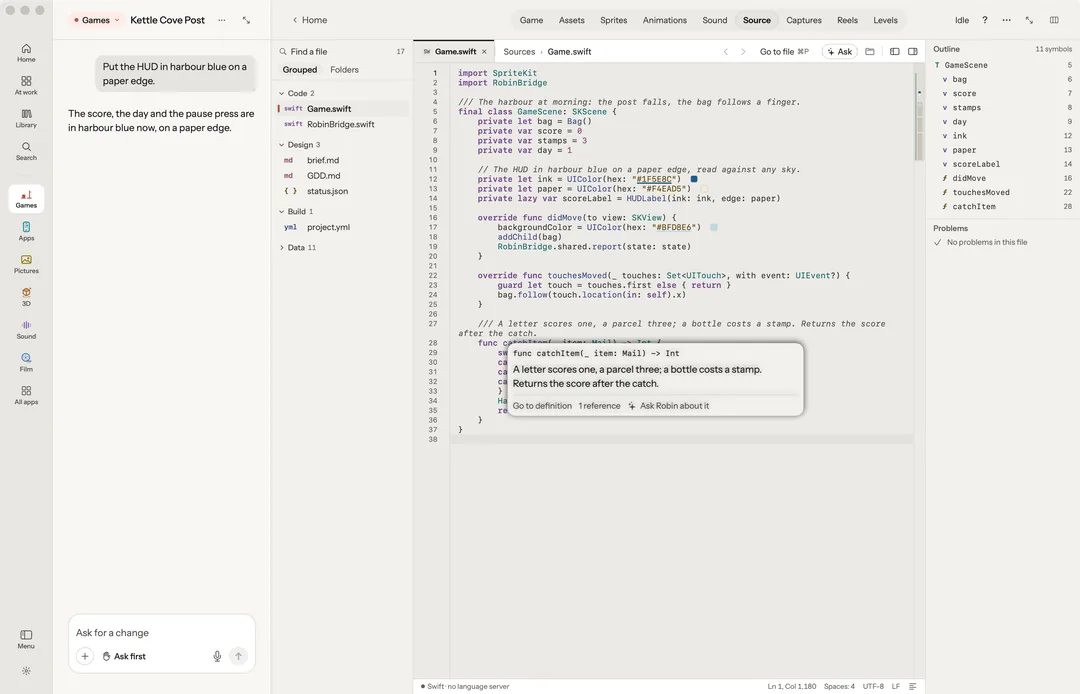
Errors, completions and go to definition come from a language server, when one is on your Mac. The status bar names the one in use and how it is doing.
- Hover a name for its signature, its documentation and its references.
- Completion as you type, with signature help on ( and ,.
- Rename F2 changes every file at once, as one step ⌘Z undoes.
- Quick fixes from the gutter’s lightbulb, or ⌥↩.
- Problems squiggles, a dot in the gutter, and the worst said at the end of its line.
Servers it finds on your Mac.
Robin finds servers for TypeScript and JavaScript, Swift, C, C++ and Objective-C, C#, Python, Go, Rust, Kotlin, JSON, CSS and HTML, YAML and Markdown. With no server, a file is still edited and coloured, and the status bar says which is missing. How to install asks first, then runs the command in Robin’s terminal, where you watch it. Robin never installs one silently.
What Robin wrote, marked.
What Robin wrote is marked in the gutter; rest on a mark to see what was asked and when, with Compare with before and Undo it. The file map down the right edge shows each type and function, each problem and Robin’s marks. ⌘P goes to a file, ⌘T to a name in the project, and Open in Xcode, Android Studio or VS Code opens the project in its own app.
Coding agents, in a chat.
New Claude Code starts a chat that runs in the Claude Code you installed, with your own plan or key. New OpenCode, New Codex and New Cursor offer the other agents on your Mac the same way. Each keeps its own sign-in; Robin reads none of your keys. Their words and steps show in the chat as they come, and Stop ends a turn and keeps what was said. The rail also holds Files with git, the project’s Terminal, and Screen, which drives any Mac app by its controls.
The price before you press.
Every make says what it costs and whose it is before it runs. Above the limit you set, it waits for your yes.
Free, on this Mac
- The editor, git and the terminal
- Language servers on your Mac
On your Claude plan or your own key
- A coding agent’s chat: its own sign-in, plan or key, billed by its provider
Works with what you use.




Code, and eleven more apps beside it.
Robin is one app on your Mac: $39 for the first 100 licences, then $59, paid once, for two Macs and every update.